Thursday, November 7, 2019

Competitive programming quickstart guide


How to become a Competitive Programmer in 2 hours:

This guide works for you if you are have never solved problems online before and you know how to code a `for loop` and you know what `arrays` are in any programming language.


Step 1: Register in ProjectEuler and solve this problem. You can solve this offline and submit the solution in the textbox. This should take you 15 minutes.

Step 2: Solve this problem and submit the solution in the text box. This should take you 30 minutes.

Step 3: Register in SPOJ and solve this problem. Note that you've to submit your source code. This should take you 15-30 minutes.

Step 4: Solve this problem and submit your source code. This should take you 30 minutes.

You can spend the remaining time in any problem in case you get stuck. 

Congrats! You are officially a competitive programmer now.


  • Let me know if this guide worked for you in comments and let me know how long it took for you.
  • If you are able to complete this guide, you can gradually increase difficulty and practice on your way to become a topcoder!

Wednesday, March 20, 2019

Getting started with AI Programming through Codingame

From simple bots like Cleverbot, Akinator to complex bots like video game AIs and self driving cars, Artificial Intelligence has become an important part of our daily life.

Prerequisites to get started with AI:

All you need to know is a programming language.


Getting Started with AI Programming through Codingame:

Codingame is the best platform to get started with Artificial Intelligence.

Lets start with a small racing game. In this game you have to code to drive a car faster than your opponents in a small track to complete 3 laps.


Step 2: Choose your favorite programming language of your choice


Step 3: Click "Play my code" button 


You'll be able to see the game playing


If your pod(car) is not moving, check if you are printing the correct x and y coordinates that you get in the input.

Step 4: Compete with the boss.


You may have to increase your thrust. (Beware that too much speed can affect your car when cornering)


Step 5: Click the submit button once you defeat the boss!


Step 6: You'll get promoted to the next league where you will face difficult opponents and you'll have to work with extra details.

The league system:

To get promoted to the next league you have to get more points than the boss in that level. (This means that your code must win more than 60% of the games). 


For the lower leagues if, else statements should be sufficient. By the time you reach Gold, you'll have a great knowledge how to predict the future and how to counter an opponent.You would have created a great AI bot by then.


Step 7: Bot programming challenges and community contests 

You can check out other AI challenges in the bot programming section in the Compete tab. Also watch out for the upcoming community contests.


Best of luck in advance for your first AI bot! Share your experience in comments.

Friday, March 15, 2019

Topcoder applet/arena - Simple way to install super useful plugins

Why install plugins for Topcoder applet/arena?


Plugins auto-generate the code that you repeatedly use in every problem. i.e. imports, class definition, function definition etc., This means when you open a problem, you can directly start programming your logic without worrying about importing headers, declaring classes and defining the function parameters. This boosts your score for every problem as you save few minutes in the contest.


How to install a plugin?


If you haven't used topcoder plugins before, one of the beginner friendly plugin is KawigiEdit. Here is how you can install it


  1. Download the latest KawigiEdit jar to your computer (and remember where you saved it).
  2. Start the TopCoder Arena applet. Install JRE from java.com and resolve the security issue while opening using these instructions (Control Panel -> Java in Windows (or) System Preferences -> Java in Mac). 
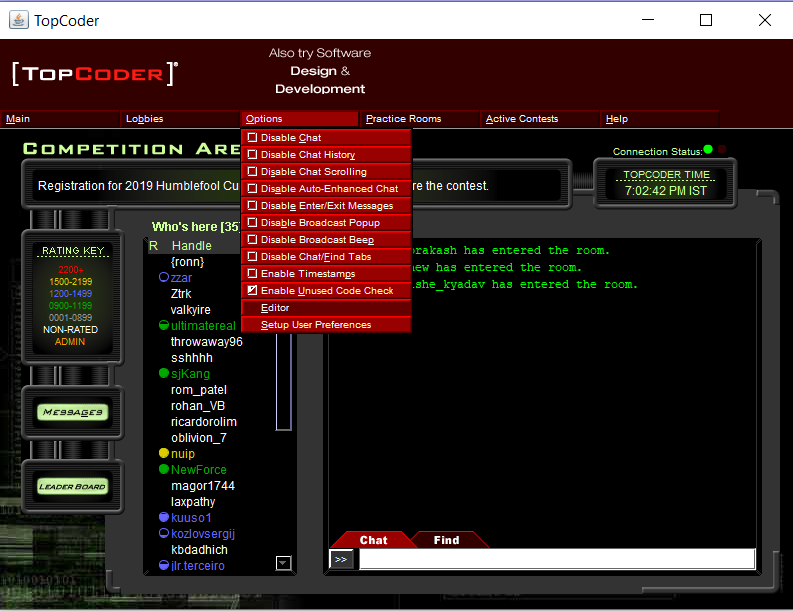
  3. From the Options menu, choose "Editor". The Editor Preferences dialog should come up.
  4. Click on the "Add" button. A dialog titled "Enter Plugin Information" should pop up.
  5. For "Name", enter "KawigiEdit" (or whatever you want it to be called, it doesn't really matter)
  6. For "EntryPoint", enter "kawigi.KawigiEdit" (this one does matter).
  7. For "ClassPath", hit "Browse" and find the KawigiEdit jar. You should not have a previous version of KawigiEdit in the global classpath (in the text field on the top of the Editor Preferences Dialog).
  8. Once those are entered in correctly, click OK.
  9. If you want KawigiEdit to be used as your default editor, check the "Default" box next to the new entry in the table. I recommend setting it as your default editor, of course.
  10. Click "Save". If you get errors here, make sure that you are absolutely using Java 1.5, and that no previous version of KawigiEdit is in the classpath, and if that's all in order and you're still having problems, contact me personally or see if you can find anyone in the arena who knows a lot KawigiEdit.
  11.  Now if you open any problem in topcoder, you can see the headers and classes auto generated.Now KawigiEdit will be ready to use! 
  12. Of course, to get the most out of KawigiEdit, you will probably want to tweak the configuration.

But I prefer FileEdit plugin because it is also helpful to use my own editor to code. (In my case : Visual Studio)
  1. Download FileEdit.jar
  2. Follow step 2,3, and 4 (in Kawiji)
  3. Click on Browse and select the downloaded FileEdit.jar file
  4. Now enter fileedit.EntryPoint as entry point (for name choose any) and click OK.
  5. Click on Save
  6. Now open any problem. You'll see the file location in the coding area. 
  7. You can use any favorite editor of your choice (Visual Studio in my case). You'll also see the auto generated source code which will auto communicate with topcoder. For advanced changes you can configure in the editor.

Reference: Topcoder forum

Saturday, March 25, 2017

Applications of Vector algebra


This post does not cover all the applications of Vectors. This only covers very few real world applications.

Before we proceed lets recall..

What are vectors?

Vector is a quantity having a direction and a magnitude.

Example : A car moving east with a velocity V. Here velocity is a vector quantity because it has both magnitude (how fast the car is moving) and direction (east).

Some of the terms/properties we may have learnt from school : magnitude, Vector addition, subtraction, dot product, cross product etc.,

What is an Origin? : Origin is an assumption point from which every other position is referred.

For example if I am the origin and I'm looking at a cat that is 2 meters away from me, then if I assume my position at (0,0) and draw a line towards the cat, the length of the line will be 2 meters.

Warm up example : (vector addition)


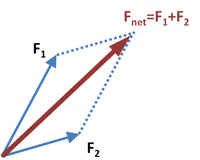
Two forces are acting on a stationary object F1 and F2. Suppose if F1 and F2 are equal, then the resultant direction of the object will be the vector addition of these two forces. How much the object will move can be found using parallelogram law of forces.


Example application 1 : 
(vector subtraction, magnitude of vector, unit vectors)
Given the Tamil Nadu map with origin at Chennai (we know the exact location of any city from the origin in the given map), find the exact location of Erode with respect to Madurai. (all co-ordinates in kilometers)


By vector property,
Chennai to Erode vector = Chennai to Madurai vector + Madurai to Erode Vector

Madurai to Erode vector = Chennai to Erode Vector - Chennai to Madurai vector


= (-350 i - 220 j) - ( - 214 i - 360 j)
= -136 i + 140 j

This means that Erode is located 136 kms west and 140 kms north to Madurai.

If we have to compute the distance from Madurai to Erode, we just have to find the magnitude of the vector

distance = sqrt(-136^2 + 140^2) = 195.2 kms

To find the unit vector we have to divide the vector by the distance

Madurai to Erode unit vector = (-136 i + 140 j)/195.2 = - 0.69 i + 0.72 j. If we calculate the magnitude of the unit vector it will be exactly 1.

Now suppose if we have to find the position of that tea stall that is exactly 50 kms in the direction from madurai to erode, we have to multiply 50 with this unit vector

Tea stall position with respect to Madurai = 50 * (-0.69 i + 0.72 j)
= -34.5 i + 36j

i.e. Tea stall is exactly 34.5 Kms west and 36 kms north from Madurai.

In the example we've used 2 dimensional positions.

Suppose we had to compute the distance or position the same way for satellites, planets and galaxies in 3D, we can use the same method.

Example application 2 :


What you can understand : When to use dot product and when to use cross product

Lets assume you design a humanoid robot with a gun. Now suppose you want to program the robot to shoot a balloon you need to know what angle the robot should turn in order to shoot the balloon.

Suppose lets say your robot is stationary at position (0,0) (origin) facing east.

i.e. facing directional vector = i

Now lets say the balloon is at position (6,9).

target unit vector = (6i + 9j) / sqrt(6*6+9*9)
= 0.55i + 0.83j

The robot has to turn an angle in the anti clock wise direction until the gun is pointed at position 6,9.

To find this angle you can use dot product..

initial vector . target vector = initial vector * target vector cos Theta

Theta = cos-1 (initial vector . target vector)
= cos-1 (0.55 i + 0.83j  . i + 0j)
= cos-1 0.55

= 56.63 degrees


Cross product is usually used when we need a 3rd perpendicular vector (in a 3D space)

Always remember this 2 line rule :

1) Dot product is used to find the angle between two vectors

2) Cross product is used in case of 3D when we need to find how much a vector is tilted from each axis.
Cross product is also applied when we find angular momentum, Torque etc.,

Example application 3 :


Vector physics

From the above problem you have found the angle your robot has to rotate to shoot the balloon. Now assume the bullet is traveling from the gun towards the balloon and you need to find the position of the bullet after 0.5 seconds after you shoot.

Bullet position = Gun position + velocity vector of the bullet * T


The same principle is used if you need to find the position of a rocket when a rocket is launched in space. Note that friction, gravity and other external factors should also be considered. In vacuum, we can safely assume that there are no external factors.


Few more :

1) Vectors are used in every game you play. So if you want to create games, you've to be strong in vector algebra.

2) 3D glasses / VR glasses project 2 different 2D images. It appears 3D because of a hack called Depth Vector! Our naked eyes is capable to see things on 3D because it knows how far is every pixel/color of an object is. This is exactly what is projected in the two images (distance from left eye in the left eye image, distance from right eye in the right eye image)

Saturday, October 25, 2014

Getting started with 3D games and applications

Step 1: Modelling:
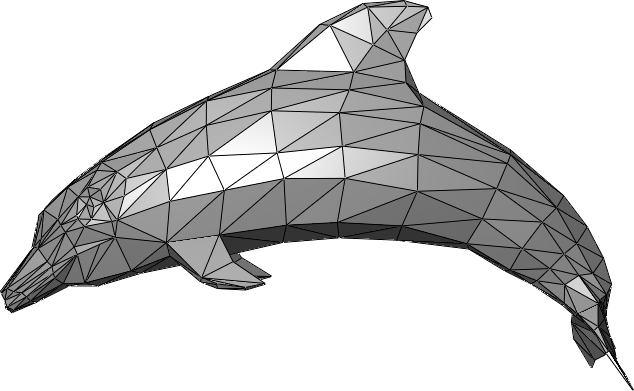
     The first step is to create the 3D models(meshes) required for your game or application. 3D characters are made up of triangles. There are many modelling tools. But note that Blender is the most popular free open source tool.

Step 2: Texture mapping:


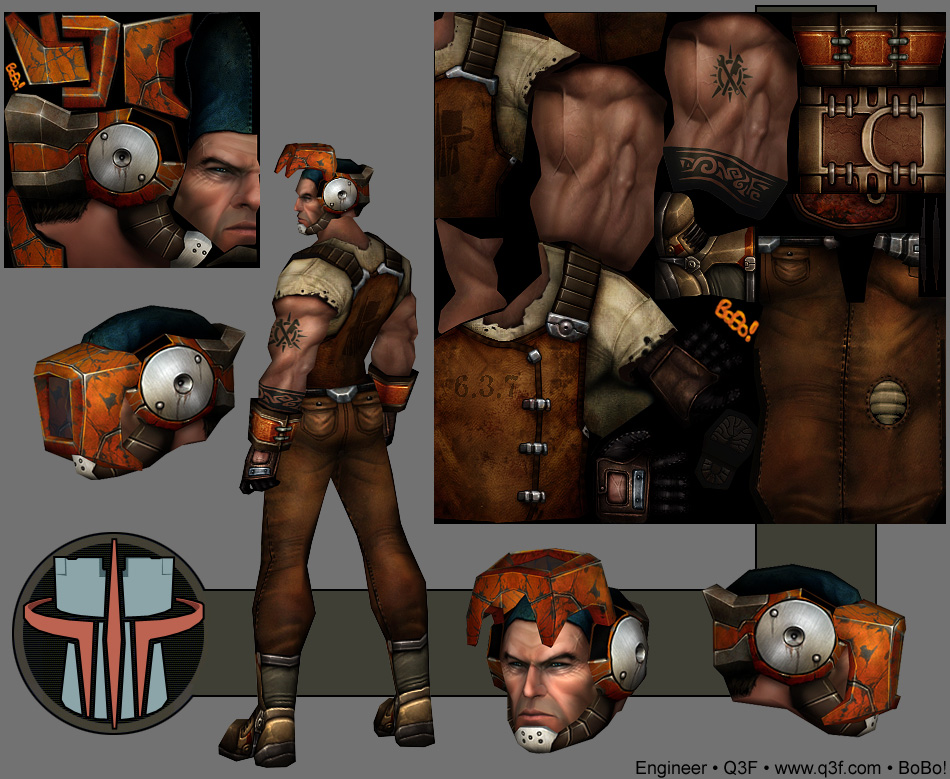
     The second step is to paint the 3D model with attractive colours and thereby create the UV-map for the created 3D models.

Step 3: Rigging:


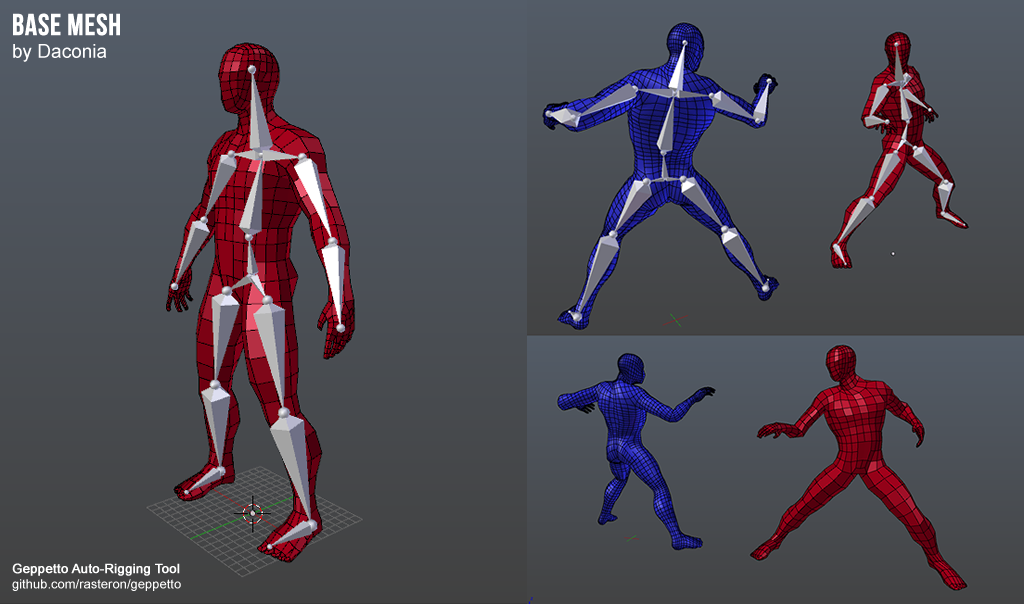
     In case your game/application includes animating human/animal meshes you require rigging. In this process, you assign some weight for each joint in the bone with every vertex in every triangle in the mesh which are affected by respective bone. This helps smooth animation to the skin.

Step 4: Animation:


     Animation data is stored in the form of position and rotation for each joint in each frame. These frame loops can also be created using softwares like Unity3D, Blender, Maya etc.,

Step 5: Applying Shaders:


     This is the most complex step in the process. In this process, we perform the calculations required for camera movements and shadows. This is where all your knowledge in Matrix Algebra and Vector Algebra will be applied.


Steps involved in Game Development

1. Modelling

2. Creating texture map
3. Rigging
4. Animation
5. Applying Shaders
6. Game play (Depends on your game)
7. UI and music (Menu, Scoreboard, Background sounds etc.,)


For learning some important concepts on meshes, triangles and all the math involved behind 3D games, you can watch the videos in this youtube channel.


To start with OpenGL in C++, I'd suggest you can directly start running the examples in Irrlicht and thereby start developing 3D games quickly. You can download the freely available 3D characters from the web.